
How to Roll Out NetSuite Next Role by Role, and What to Decide First
If your account is eligible, an administrator has already seen the banner. Behind it sit three buttons and two access pages, and the clicking takes about ten minutes. Deciding what to click is the part worth slowing down for, because one of the settings takes away the way back and Oracle has not documented what happens when you reverse it.
How do you enable NetSuite Next? An administrator sets access role by role at Setup, Company, AI, NetSuite Next Access, choosing NetSuite Next only, Optional or No access for each eligible role. Ask Oracle is granted separately on its own page and is off for every role by default. Oracle has published no date on which NetSuite Next becomes mandatory, and Center roles are not eligible at all.
What You See When the Account Is Eligible
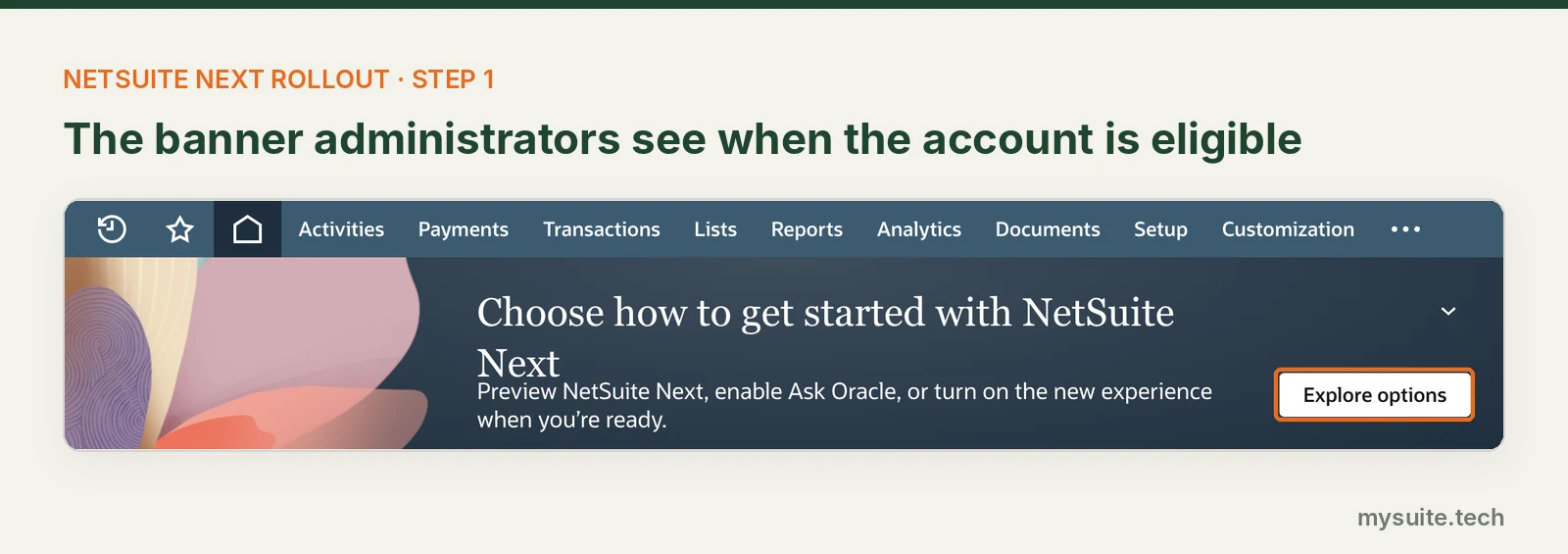
Shortly after an account updates to 2026.2, administrators of eligible accounts get a banner offering to preview NetSuite Next, enable Ask Oracle, or turn the new experience on in production. Oracle began the North America rollout with 2026.2 and lists the United States and Canada as available, with more countries following.
Coverage of SuiteWorld put several other regions on timelines that contradict each other, so the only answer that holds for your account is whether the banner is there.
Two things gate it. AI functionality has to be switched on, since both Ask Oracle and NetSuite Next depend on it. And eligibility is phased, so an account already on 2026.2 without the banner is waiting rather than broken.
What it does not involve is a project. Oracle describes data, roles, permissions, customizations and workflows as carrying over unchanged, with no migration or reimplementation, and NetSuite Next running on the same subscription you already pay for.
Three Buttons, Three Different Commitments
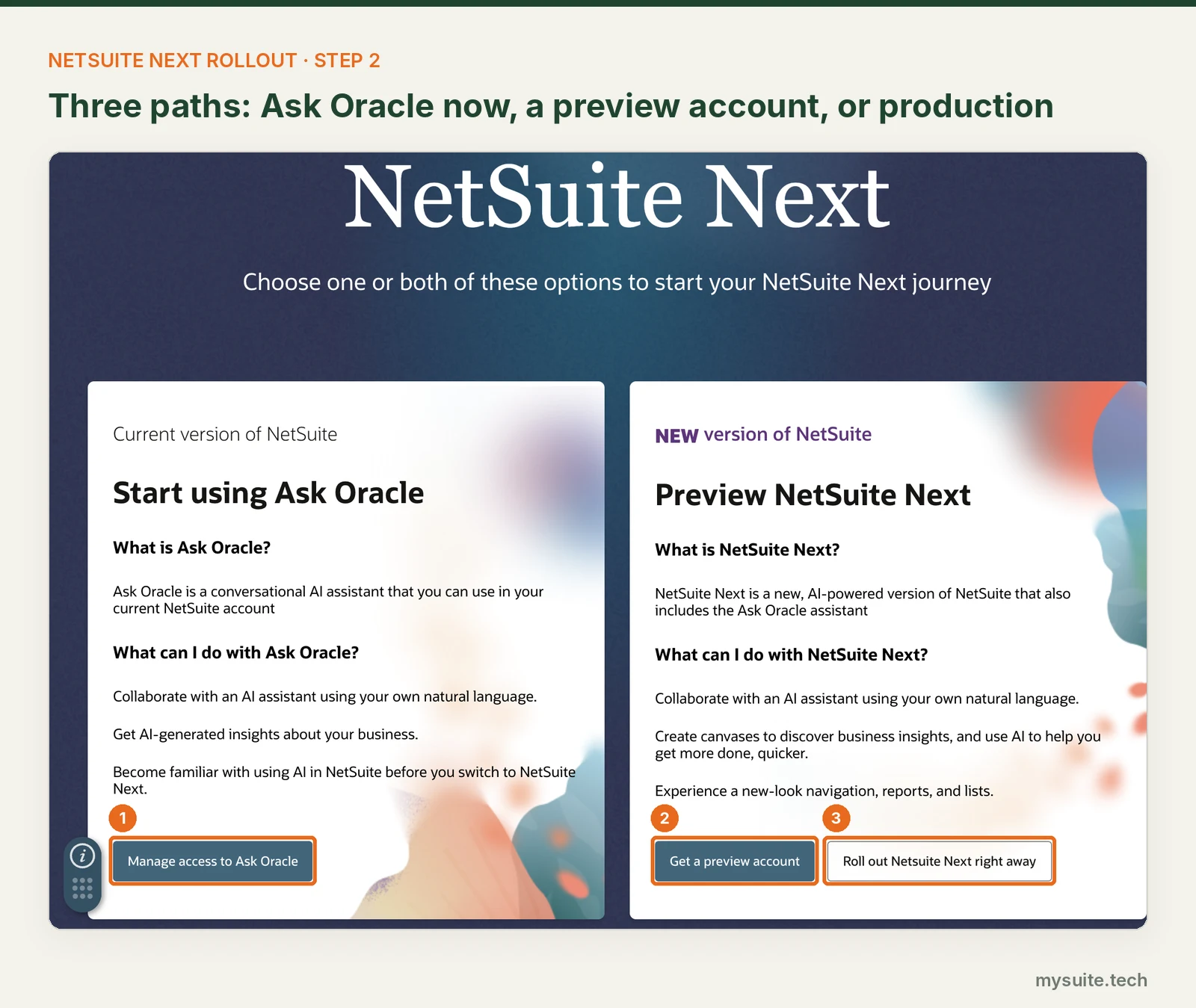
Manage access to Ask Oracle works in your current account, today, with no interface change at all. It is the cheapest first step and the easiest to walk back.
Get a preview account creates a copy of production in a separate environment, carrying a snapshot of your data, workflows and customizations. It runs for thirty days, nothing you do in it touches production, and you can request another one whenever you want. Eligible accounts also get NetSuite Next in their sandboxes at the same time as the primary account, which gives you a second place to test that does not expire.
Roll out NetSuite Next right away is the one I would leave alone on the first visit. Oracle does not document what it does. That phrasing appears nowhere in the Help Center procedures, which describe enabling NetSuite Next in production and managing access by role as separate things. Whether the button opens the access page or changes settings in bulk is not written down anywhere I can find, so work out your role settings before you discover the answer.
Testing does not draw down the production budget, incidentally. AI Units are counted separately across sandboxes, development accounts and preview accounts.
The Three Settings, and the One That Takes Away the Way Back
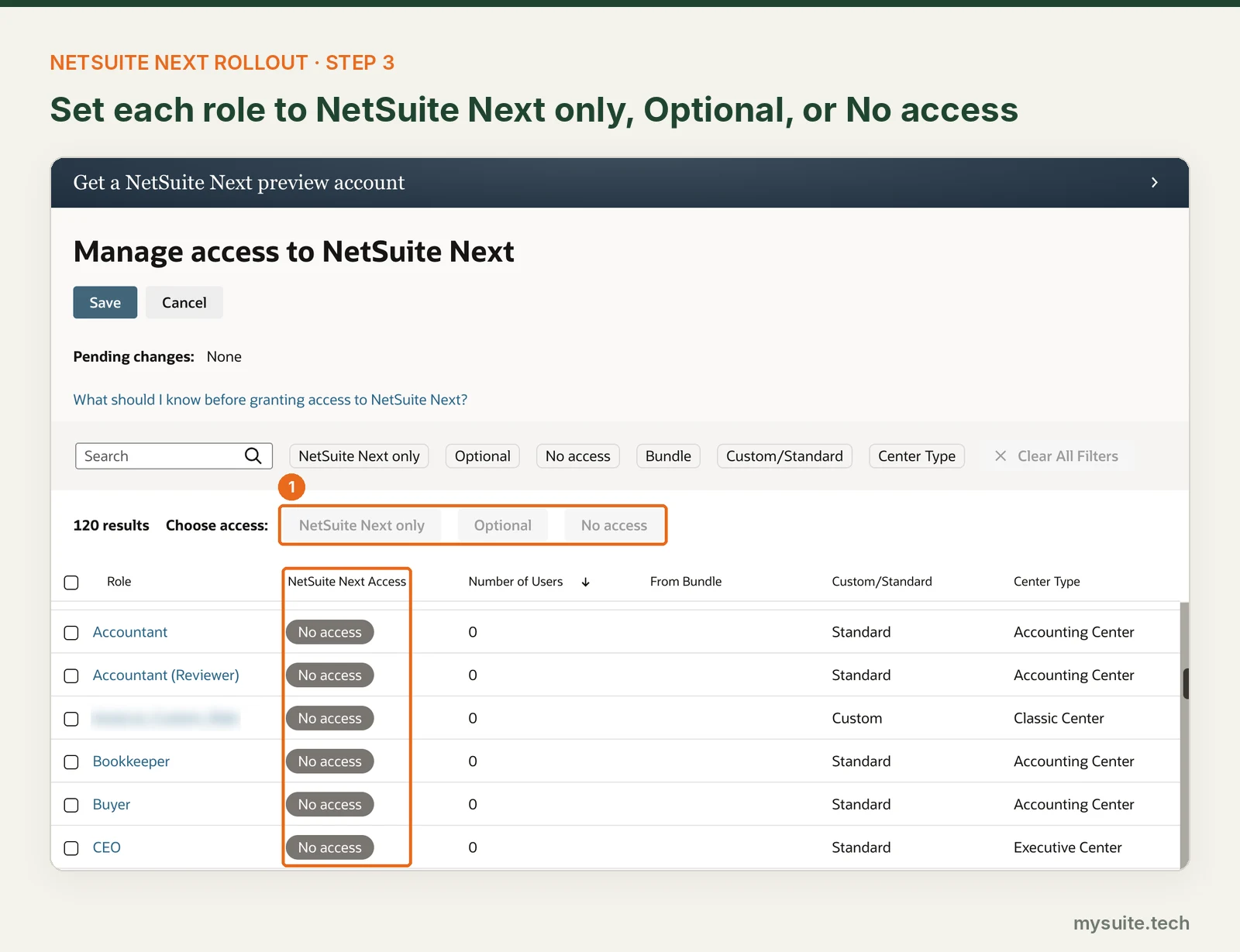
Setup, Company, AI, NetSuite Next Access. The page lists each eligible role alongside how many users hold it, which bundle it came from, whether it is custom or standard, and its center type. Select one role or several, choose a setting, save.
Three settings, in Oracle's words:
| Setting | What it does |
|---|---|
| NetSuite Next only | Users can only use NetSuite Next. Their environment switches at their next login |
| Optional | Users can switch between the current version of NetSuite and NetSuite Next |
| No access | Users continue to use the current version and cannot access NetSuite Next |
Optional and NetSuite Next only are not two speeds of the same thing. Under Optional, a user hovers over their name, clicks Switch to NetSuite Next, and clicks Exit NetSuite Next when they want to come back. Under NetSuite Next only, Oracle notes that depending on the role, a user may not have the option to exit at all. One of those is a pilot and the other is a migration, and the page offers them as adjacent buttons.
Two constraints worth knowing while you plan. Center roles are not eligible: Advanced Partner Center, Customer Center, Employee Center, Partner Center and Vendor Center do not appear on the page. And only the Administrator role can open it, with no permission that delegates the job.
One naming note, since it will trip anyone cross-referencing documentation. The 2026.2 release note called the third setting Blocked.
The page says No access.
Ask Oracle Is a Separate Switch, and It Starts Off
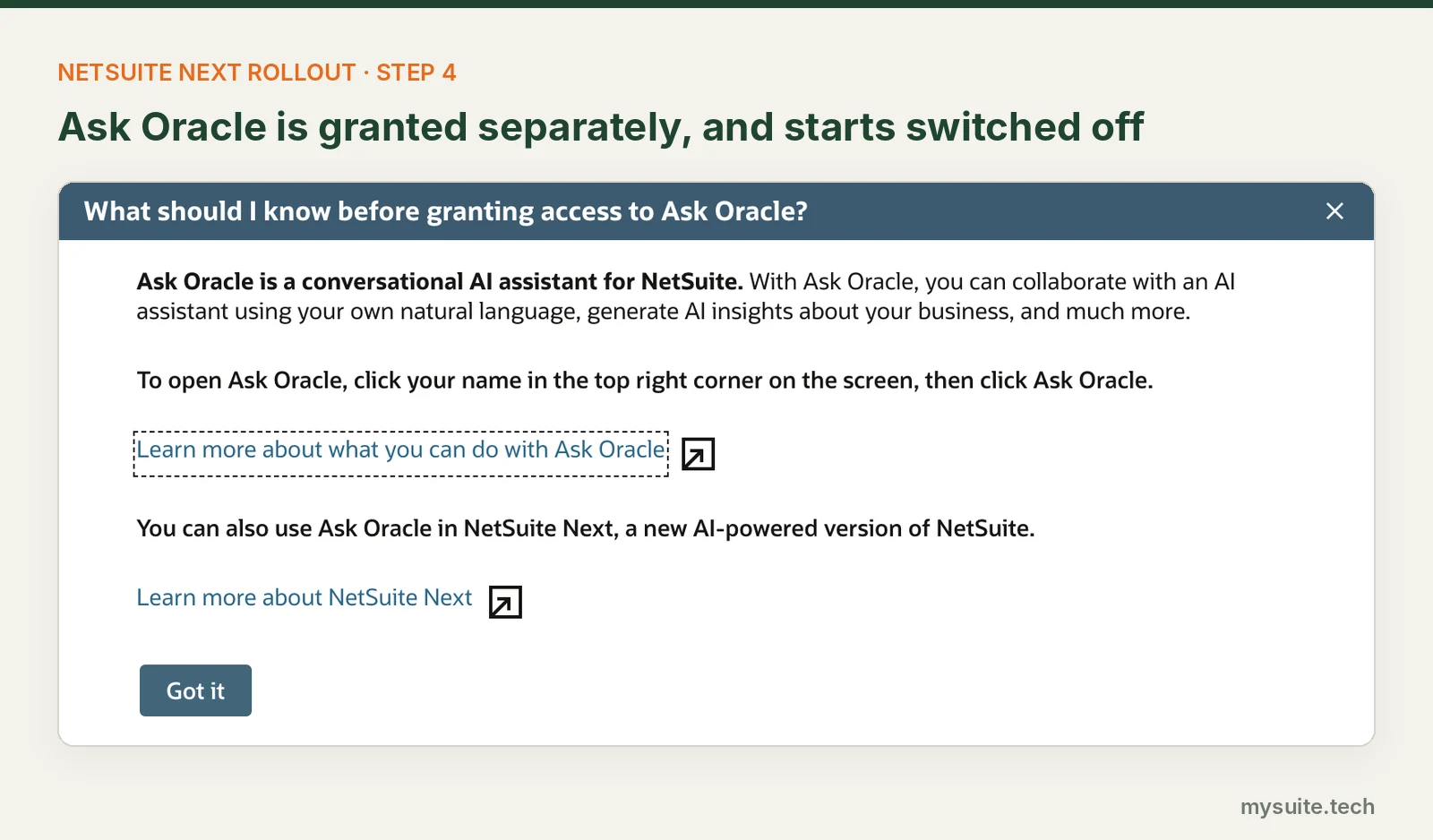
Granting NetSuite Next does not grant Ask Oracle. It has its own page, its own role list, and it is off for every role until somebody switches it on.
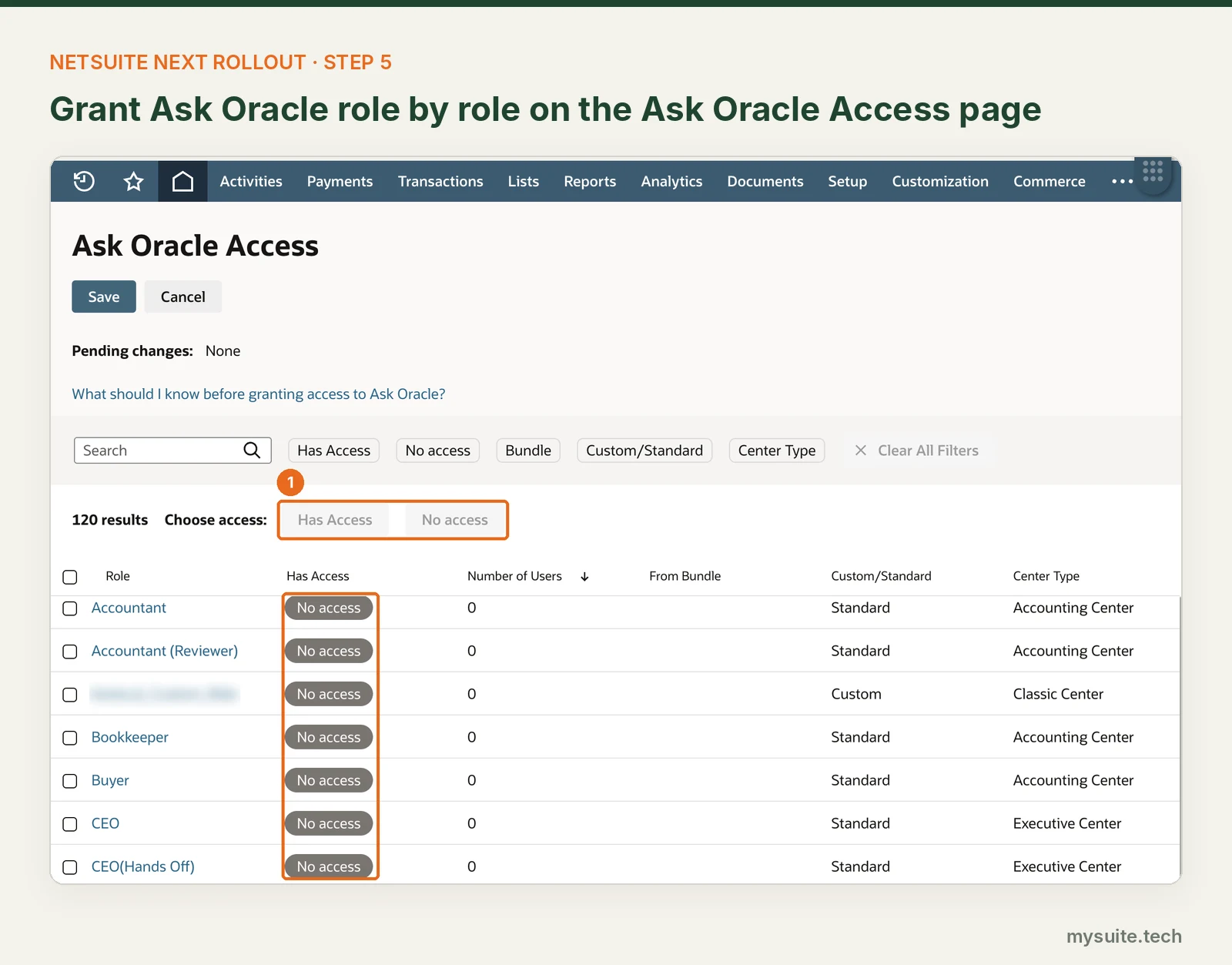
It is worth treating this as a permissions decision rather than a feature toggle. Ask Oracle operates inside the permissions of whatever role the user is in. It reads what that role can read, uses saved searches that role can open, and drafts records from the text of a conversation. Granting it to a role hands that role a new way to exercise the permissions it already had, which is fine when those permissions are current and awkward when they have drifted.
Oracle gives one instruction here that is easy to skim past: if you are using the Administrator role, switch to another role with Ask Oracle access before entering a prompt. Taking that seriously changes how you test.
On navigation, Oracle publishes two paths. The release note says Setup, Company, AI, Ask Oracle Access. The procedure topic says Setup, Agent management, Ask Oracle access. The route through the banner works regardless of which is current in your account, and the page you are looking for is titled Ask Oracle Access.
Ask Oracle spends AI Units from the same shared pool as everything else, with no per-role caps. I covered what that pool is and how it is provisioned in what AI Units cost and who controls them, and where to watch the spending in the monitoring piece.
Why Administrators First Is Bigger Than It Sounds
Starting with administrators is the obvious plan and the right instinct. It is also almost certainly broader than you mean.
Access is granted per role, not per user. Setting Administrator to Optional sets it for everyone holding the Administrator role, and in most accounts that list is longer than the org chart suggests. Integration owners. An implementation partner still holding credentials from go-live. The person who inherited it years ago and has not opened NetSuite since.
A role cloned for the pilot gives you the same test with a known list of people in it.
The second adjustment is what you test as. Testing only as Administrator hides the exact problems a rollout produces, because an administrator sees everything and hits no permission walls. Oracle already says to prompt Ask Oracle under a working role, and the same logic covers the interface itself. The question is not whether NetSuite Next works, it is whether an AP clerk can still finish a bill run in it.
A Phased Plan With Exit Criteria
| Phase | Where | What you are proving | Done when |
|---|---|---|---|
| 0. Readiness | Current account | You know what might break | Script and customization inventory complete, anything touching HTML or page structure flagged, AI Unit baseline recorded |
| 1. Administrators | Preview or sandbox | Core processes survive | Close, order to cash, procure to pay and approvals run clean. Every customization marked pass, fail or adjust |
| 2. Administrators | Production, Optional | Preview matched reality | Same results on live data, tested outside close week, rollback written down |
| 3. Ask Oracle pilot | Current interface | Answers are trustworthy and spend is predictable | Answers tie back to saved searches, no permission surprises, units within budget |
| 4. Pilot roles | Production, Optional | Real users can do their jobs | Users stop switching back of their own accord |
| 5. Expand, then commit | Production | A role is ready to lose the way back | One full close cycle on Optional without falling back |
The rollback at every phase before the last one is the same move: set the role to No access.
Phase 3 is the one most plans skip, because Ask Oracle in the current interface looks like a smaller thing than a new interface. It is the phase that tells you whether the answers can be relied on, and it costs nothing in change management because nobody's screens move.
What Oracle Has Not Documented Yet
Treat these as test items rather than assumptions. I could not find an Oracle statement on any of them.
- What the Roll out NetSuite Next right away button actually does
- Whether a user's Optional choice persists between sessions, and which experience they land in at the next login
- When Optional and No access take effect for a user who is already logged in. Oracle documents next login only for NetSuite Next only
- What happens to dashboards and personalizations built in NetSuite Next when a role is set back to No access
- Whether changes on either access page are written to System Notes
- A compatibility list for Suitelets, custom center tabs, printing and PDF templates, SuiteCommerce, the mobile app and third-party SuiteApps
The last one is what I would want in hand before committing any role. Oracle says customizations are expected to keep working and names one exception: client scripts, form customizations or portlet scripts that directly manipulate HTML or page structure may need review. That answers the script question honestly. It stops well short of telling you whether anyone has tested printing.
For the inventory work in phase 0, N/runtime.isNextActive() returns true when NetSuite Next is active and works in both client and server scripts, which makes conditional logging possible while two experiences run side by side. It returns false for scheduled and map/reduce scripts running as System.
Timing, and Who Signs Off
Two scheduling rules. Do not change role access during close or quarter end, because Oracle documents the switch as happening at next login and says nothing about users who are already in a session. And give each wave a full close cycle before widening, since close is when a reporting difference turns into a reporting problem.
The administrator runs the rollout. The decision to grant Ask Oracle to a role belongs with whoever owns that role's permissions, which in finance usually means the controller, because it is an access decision with an audit trail attached to it. In NetSuite Next, System Notes carries an AI Used column that identifies actions taken through Ask Oracle, with the originating user still recorded against the change.
One question worth settling before the first role moves. When a pilot user hits something that does not work, who do they tell, and will that person know which of the two experiences the user was in when it happened?
Need help with NetSuite?
A role by role rollout is several weeks of structured testing wrapped around a close calendar, and it lands on whoever already owns the account. If that person is already full, this is the sort of work I pick up between closes: the customization inventory, the test scripts per role, and the pass or fail call on each wave.
Frequently Asked Questions
How do you enable NetSuite Next for a role?
An administrator opens the NetSuite Next Access page at Setup, Company, AI, NetSuite Next Access, selects one or more eligible roles, and sets each to NetSuite Next only, Optional or No access. Only the Administrator role can open the page. Roles with Advanced Partner Center, Customer Center, Employee Center, Partner Center or Vendor Center types are not eligible.
What is the difference between NetSuite Next only and Optional?
Optional lets users move between the current version of NetSuite and NetSuite Next from the profile menu, so they can return to the interface they know. NetSuite Next only switches the role at the next login, and Oracle states that depending on the role a user may not have the option to exit. Optional suits a pilot, and NetSuite Next only is a rollout decision.
Does Ask Oracle come with NetSuite Next access?
No. Ask Oracle is granted separately on its own access page and is off for every role by default. It also runs in the current NetSuite interface without enabling NetSuite Next at all, which makes it the lower risk first step.
Can you roll out NetSuite Next to individual users?
No. Oracle states that access is granted per role. Setting a role to Optional or to NetSuite Next only applies to every user assigned that role, so a pilot group of named people needs a custom role rather than a list of users.
 By: Patrick Olson 11/03/2026
Read Next - How to Audit a NetSuite Account