
Real-Time Status Pages in NetSuite
The Problem
If you have ever kicked off a bulk operation in NetSuite and stared at a blank screen wondering whether anything is actually happening, this post is about solving that.
NetSuite's Map/Reduce engine is great for processing records in bulk, but out of the box it gives users almost no visibility. You submit a task, get a task ID, and hope for the best. Maybe you check the Map/Reduce Script Status page. Maybe you don't.
For operations where users are selecting specific records and need to know what succeeded and what failed, that is not good enough.
We have shipped this pattern in production across multiple use cases: bulk status flips, batch payment processing, mass email sends. The structure is always the same, and it works every time.
The Architecture
The pattern has four components:
- A Suitelet that serves three roles: selector page, status page, and JSON progress endpoint
- A Custom Record that acts as a job log (one row per record being processed)
- A Map/Reduce Script that does the actual work and updates log rows as it goes
- Client-side JavaScript embedded in the status page that polls the Suitelet for updates
Here is what the finished status page looks like mid-run:
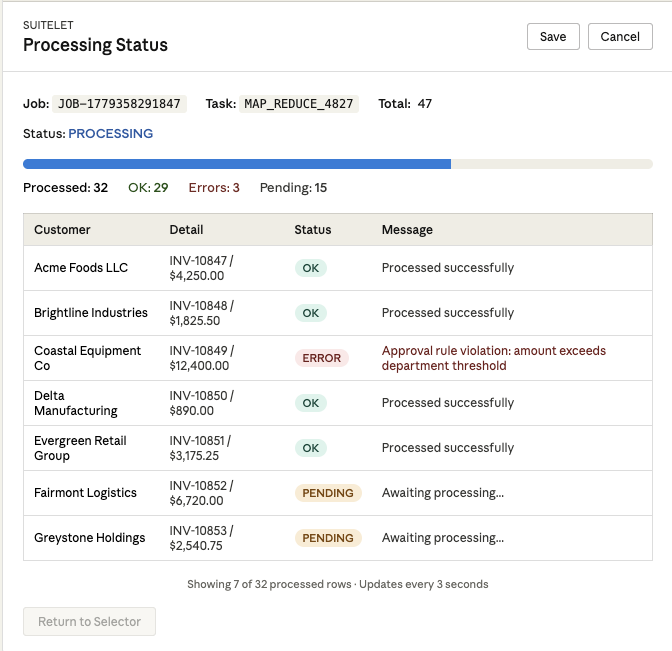
Here is how the components connect:
User selects records
        |
        v
  [Suitelet POST]
   - Creates job log rows (status = PENDING)
   - Launches Map/Reduce with job ID
   - Redirects to status page (GET)
        |
        v
  [Status Page]                    [Map/Reduce]
   - Polls ?action=progress  <-->  - Processes each record
     every 3 seconds                - Updates log row to OK or ERROR
   - Renders progress bar
   - Shows record-level results
        |
        v
  [Done - "Return" button enabled]
We will walk through each piece.
Step 1: The Job Log Custom Record
Create a custom record type (e.g., customrecord_job_log) with these fields:
| Field ID | Type | Purpose |
|---|---|---|
custrecord_jl_job_id | Free-Form Text | Groups all rows for a single run |
custrecord_jl_job_type | Free-Form Text | Distinguishes between different processes sharing the same log |
custrecord_jl_status | Free-Form Text | PENDING, OK, or ERROR |
custrecord_jl_message | Free-Form Text (Long) | Success confirmation or error details |
custrecord_jl_record_id | Free-Form Text | The internal ID of the source record |
custrecord_jl_col1 through custrecord_jl_col4 | Free-Form Text | Display columns (customer name, amount, etc.) |
custrecord_jl_result_id | Free-Form Text | Internal ID of whatever the MR created (optional) |
The generic column approach (col1 through col4) is intentional. It means you can reuse the same log record type across completely different processes. The Suitelet controls the column headers. The log just stores the data.
Tip: Don't use a Select/List field for status. A plain text field with PENDING, OK, ERROR is simpler to query and update from script, and you avoid list value mismatches across environments.
Step 2: The Suitelet (Three Modes in One Script)
The Suitelet's onRequest entry point routes based on request method and parameters. This is the key architectural decision: one deployment serves the selector, the status page, and the progress API.
/**
 * @NApiVersion 2.1
 * @NScriptType Suitelet
 */
define([
  'N/search', 'N/ui/serverWidget', 'N/task', 'N/runtime',
  'N/log', 'N/url', 'N/redirect', 'N/ui/message'
], (search, serverWidget, task, runtime, log, url, redirect, message) => {

  const MR_SCRIPT_ID = 'customscript_your_mr_script';
  const MR_DEPLOY_ID = 'customdeploy_your_mr_deploy';

  // Job log record + fields
  const LOG_RT   = 'customrecord_job_log';
  const F_JOBID  = 'custrecord_jl_job_id';
  const F_STATUS = 'custrecord_jl_status';
  const F_MSG    = 'custrecord_jl_message';
  // ... other field constants

  const JOB_TYPE = 'MY_PROCESS'; // identifies this process in the shared log

  function onRequest(ctx) {
    const req = ctx.request;

    // Route 1: JSON progress endpoint
    if (req.method === 'GET' && req.parameters.action === 'progress') {
      return respondProgress(ctx);
    }

    // Route 2: Status page (GET with job parameters)
    if (req.method === 'GET' && req.parameters.view === 'status') {
      const { jobId, taskId, total } = req.parameters;
      return renderStatusPage(ctx, { jobId, taskId, total: Number(total) || 0 });
    }

    // Route 3: Selector page (plain GET)
    if (req.method === 'GET') {
      ctx.response.writePage(buildSelectorForm());
      return;
    }

    // Route 4: Form submission (POST)
    handleSubmit(ctx);
  }

  return { onRequest };
});
The POST Handler: Submit, Log, Launch, Redirect
When the user submits their selections, the Suitelet does four things in sequence:
function handleSubmit(ctx) {
  const selections = collectSelections(ctx.request);

  if (!selections.length) {
    const form = buildSelectorForm();
    form.addPageInitMessage({
      type: message.Type.WARNING,
      title: 'No Selection',
      message: 'Please select at least one record.'
    });
    ctx.response.writePage(form);
    return;
  }

  // 1. Generate a unique job ID
  const jobId = 'JOB-' + Date.now();

  // 2. Launch the Map/Reduce, passing the selections and job ID
  const mr = task.create({
    taskType: task.TaskType.MAP_REDUCE,
    scriptId: MR_SCRIPT_ID,
    deploymentId: MR_DEPLOY_ID,
    params: {
      custscript_mr_data_json: JSON.stringify(selections),
      custscript_mr_job_id: jobId
    }
  });
  const taskId = mr.submit();

  // 3. Redirect to the status page (PRG pattern)
  redirect.toSuitelet({
    scriptId: runtime.getCurrentScript().id,
    deploymentId: runtime.getCurrentScript().deploymentId,
    parameters: {
      view: 'status',
      jobId: jobId,
      taskId: taskId,
      total: selections.length
    }
  });
}
The PRG pattern (Post-Redirect-Get) is critical here. If you render the status page directly in the POST response, the user refreshing the page will resubmit the form and launch the Map/Reduce again. Redirecting to a GET URL with the job parameters makes refresh safe.
Step 3: The Status Page (Inline HTML + Polling)
The status page is rendered as a NetSuite form with a single INLINEHTML field containing the entire UI. This gives you full control over the layout without fighting the form builder.
function renderStatusPage(ctx, { jobId, taskId, total }) {
const form = serverWidget.createForm({ title: 'Processing Status' });
// Build the Suitelet's own URL for AJAX polling
const selfUrl = url.resolveScript({
scriptId: runtime.getCurrentScript().id,
deploymentId: runtime.getCurrentScript().deploymentId
});
form.addField({
id: 'custpage_html',
type: serverWidget.FieldType.INLINEHTML,
label: ' '
}).defaultValue = `
<div style="margin-bottom:10px; line-height:1.6">
<div>
<b>Job:</b> <code>${escapeHtml(jobId)}</code>
<b>Task:</b> <code>${escapeHtml(taskId)}</code>
<b>Total:</b> ${total}
</div>
<div>Status: <span id="taskStatus">Starting...</span></div>
<!-- Progress bar -->
<div style="height:10px;background:#eee;border-radius:6px;
overflow:hidden;margin-top:4px">
<div id="pb" style="height:10px;width:0%"></div>
</div>
<!-- Counters -->
<div style="margin-top:6px">
<span>Processed: <b id="cProc">0</b></span>
<span style="color:green">OK: <b id="cOk">0</b></span>
<span style="color:red">Errors: <b id="cErr">0</b></span>
<span>Pending: <b id="cPend">0</b></span>
</div>
</div>
<!-- Results table -->
<table style="width:100%;border-collapse:collapse;font-size:12px;">
<thead><tr>
<th>Name</th><th>Detail</th><th>Status</th><th>Message</th>
</tr></thead>
<tbody id="gridBody"></tbody>
</table>
<!-- Completion banner + return button -->
<div id="done" style="display:none;margin-top:10px;padding:8px;
border:1px solid #0a0;background:#eaffea;color:#060;">
All done. You can safely return.
</div>
<div style="margin-top:10px">
<button id="btnBack" class="uir-button" disabled
style="padding:6px 12px;cursor:not-allowed;opacity:.5">
Return to Selector
</button>
</div>
<script>
(function(){
var job = ${JSON.stringify(jobId)};
var taskId = ${JSON.stringify(taskId)};
var total = ${Number(total) || 0};
var base = ${JSON.stringify(selfUrl)};
var pollMs = 3000;
var timer = null;
function ajax(u, cb){
var x = new XMLHttpRequest();
x.onreadystatechange = function(){
if (x.readyState === 4) cb(x.status, x.responseText);
};
x.open('GET', u, true);
x.send();
}
function esc(s){
return String(s||'').replace(/[&<>"]/g, function(c){
return {'&':'&','<':'<','>':'>','"':'"'}[c];
});
}
function render(d){
document.getElementById('taskStatus').textContent =
d.taskStatus || 'Unknown';
document.getElementById('cProc').textContent = d.processed || 0;
document.getElementById('cOk').textContent = d.ok || 0;
document.getElementById('cErr').textContent = d.err || 0;
document.getElementById('cPend').textContent = d.pending || 0;
// Progress bar
var pct = total
? Math.min(100, Math.round(((d.processed||0) / total) * 100))
: 0;
var pb = document.getElementById('pb');
pb.style.width = pct + '%';
pb.style.background = d.err ? '#f66' : '#4c8bf5';
// Results grid
var html = (d.rows || []).map(function(r){
return '<tr>'
+ '<td>' + esc(r.col1) + '</td>'
+ '<td>' + esc(r.col2) + '</td>'
+ '<td>' + esc(r.status) + '</td>'
+ '<td>' + esc(r.msg) + '</td>'
+ '</tr>';
}).join('');
document.getElementById('gridBody').innerHTML = html;
// Done?
if (d.done){
clearInterval(timer);
document.getElementById('done').style.display = 'block';
var btn = document.getElementById('btnBack');
btn.disabled = false;
btn.style.cursor = 'pointer';
btn.style.opacity = '1';
btn.onclick = function(){ window.location.href = base; };
}
}
function tick(){
var qs = 'action=progress'
+ '&jobId=' + encodeURIComponent(job)
+ '&taskId=' + encodeURIComponent(taskId);
ajax(base + (base.indexOf('?') >= 0 ? '&' : '?') + qs,
function(_, body){
try { render(JSON.parse(body)); } catch(e){}
});
}
timer = setInterval(tick, pollMs);
tick(); // fire immediately
})();
</script>
`;
ctx.response.writePage(form);
}Why 3-Second Polling?
Three seconds is a sweet spot. Faster polling wastes governance and does not add much value since Map/Reduce typically processes one record every 1 to 5 seconds. Slower polling makes the page feel unresponsive. Three seconds keeps the UI feeling live without burning through API concurrency.
Step 4: The JSON Progress Endpoint
This is the engine behind the polling. The same Suitelet responds with JSON when it receives ?action=progress:
function respondProgress(ctx) {
  const jobId  = ctx.request.parameters.jobId || '';
  const taskId = ctx.request.parameters.taskId || '';

  let total = 0, pending = 0, ok = 0, err = 0;
  const rows = [];

  // Query all log rows for this job
  search.create({
    type: LOG_RT,
    filters: [
      [F_JOBID, 'is', jobId],
      'AND',
      [F_JOBTYPE, 'is', JOB_TYPE]
    ],
    columns: [
      F_RECID, F_COL1, F_COL2, F_STATUS, F_MSG, F_RESULT,
      search.createColumn({ name: 'lastmodified', sort: search.Sort.DESC })
    ]
  }).run().each(r => {
    total++;
    const s = String(r.getValue(F_STATUS) || '').toUpperCase();
    if (s === 'PENDING') pending++;
    else if (s === 'OK') ok++;
    else err++;

    if (rows.length < 300) {  // cap to prevent massive responses
      rows.push({
        col1:     r.getValue(F_COL1) || '',
        col2:     r.getValue(F_COL2) || '',
        status:   r.getValue(F_STATUS) || '',
        msg:      r.getValue(F_MSG) || '',
        resultId: r.getValue(F_RESULT) || ''
      });
    }
    return true;
  });

  // Check Map/Reduce task status
  let taskStatus = 'UNKNOWN';
  try {
    if (taskId) {
      taskStatus = String(task.checkStatus({ taskId }).status);
    }
  } catch (e) {
    log.debug('Could not check task status', e);
  }

  const processed = total - pending;
  const taskFinished = taskStatus === 'COMPLETE' || taskStatus === 'FAILED';
  const done = (total > 0 && pending === 0) || taskFinished;

  ctx.response.addHeader({ name: 'Content-Type', value: 'application/json' });
  ctx.response.write(JSON.stringify({
    taskStatus, total, processed, pending, ok, err, rows, done
  }));
}
The "done" logic deserves attention. There are three conditions that signal completion:
- All rows have been updated (no PENDING rows remain)
- The Map/Reduce task reports COMPLETE
- The Map/Reduce task reports FAILED (stop polling, show what happened)
You need all three because the MR task status and the log rows can be briefly out of sync. The task might report COMPLETE a moment before the last log row is updated, or the other way around.
Step 5: The Map/Reduce Script
The MR script has two responsibilities: do the actual work, and keep the job log updated. The log updates are what make the status page work.
/**
 * @NApiVersion 2.1
 * @NScriptType MapReduceScript
 */
define(['N/runtime', 'N/record', 'N/log', 'N/search'],
  (runtime, record, log, search) => {

  const LOG_RT   = 'customrecord_job_log';
  const F_JOBID  = 'custrecord_jl_job_id';
  const F_STATUS = 'custrecord_jl_status';
  const F_MSG    = 'custrecord_jl_message';
  const F_RECID  = 'custrecord_jl_record_id';
  const F_COL1   = 'custrecord_jl_col1';
  const F_COL2   = 'custrecord_jl_col2';
  const F_RESULT = 'custrecord_jl_result_id';
  const JOB_TYPE = 'MY_PROCESS';

  function getInputData() {
    const json = runtime.getCurrentScript()
      .getParameter({ name: 'custscript_mr_data_json' }) || '[]';
    const jobId = runtime.getCurrentScript()
      .getParameter({ name: 'custscript_mr_job_id' }) || '';
    const items = JSON.parse(json);

    // Create PENDING log rows. This is what the status page reads.
    items.forEach(item => {
      const logRec = record.create({ type: LOG_RT });
      logRec.setValue({ fieldId: F_JOBID,  value: jobId });
      logRec.setValue({ fieldId: 'custrecord_jl_job_type', value: JOB_TYPE });
      logRec.setValue({ fieldId: F_STATUS, value: 'PENDING' });
      logRec.setValue({ fieldId: F_RECID,  value: String(item.recordId || '') });
      logRec.setValue({ fieldId: F_COL1,   value: String(item.name || '') });
      logRec.setValue({ fieldId: F_COL2,   value: String(item.detail || '') });
      logRec.save();
    });

    return items;
  }

  function map(ctx) {
    const item = JSON.parse(ctx.value);
    const jobId = runtime.getCurrentScript()
      .getParameter({ name: 'custscript_mr_job_id' }) || '';

    // Find this item's PENDING log row
    let logRecId = findLogRow(jobId, item.recordId);

    try {
      // ========================================
      // YOUR BUSINESS LOGIC HERE
      // (create a record, update a status, send an email, etc.)
      // ========================================
      const resultId = doWork(item);

      // Mark log row as OK
      if (logRecId) {
        record.submitFields({
          type: LOG_RT, id: logRecId,
          values: {
            [F_STATUS]: 'OK',
            [F_RESULT]: String(resultId),
            [F_MSG]: 'Processed successfully'
          }
        });
      }
    } catch (e) {
      // Mark log row as ERROR
      if (logRecId) {
        record.submitFields({
          type: LOG_RT, id: logRecId,
          values: {
            [F_STATUS]: 'ERROR',
            [F_MSG]: String(e.message || e).substring(0, 4000)
          }
        });
      }
    }
  }

  function findLogRow(jobId, recordId) {
    let id = null;
    search.create({
      type: LOG_RT,
      filters: [
        [F_JOBID, 'is', jobId], 'AND',
        [F_RECID, 'is', String(recordId)], 'AND',
        [F_STATUS, 'is', 'PENDING']
      ],
      columns: ['internalid']
    }).run().each(r => { id = r.id; return false; });
    return id;
  }

  return { getInputData, map };
});
Where to Create the Log Rows
You have two options for when the PENDING rows get created.
Option A: In the MR's getInputData (shown above). This keeps the log creation co-located with the processing logic. The tradeoff is a brief gap between the redirect and when rows appear on the status page.
Option B: In the Suitelet POST handler, before launching the MR. Rows exist immediately, so the status page shows them right away even before the MR starts. If instant feedback matters for your use case, this is the better choice.
Both work. We have used both depending on the situation.
Design Decisions Worth Calling Out
One Suitelet, Multiple Roles
Routing the selector, status page, and progress API through a single Suitelet means one script deployment, one URL, and trivial self-referencing for the AJAX poller. You could split the progress API into a separate Suitelet, but it adds deployment overhead for no real benefit.
Inline HTML vs. N/ui/serverWidget
The status page uses raw HTML injected via INLINEHTML rather than NetSuite's form builder. This is deliberate. The serverWidget API cannot render progress bars, live-updating counters, or AJAX-driven tables. For the selector page where you need checkboxes, sublists, and submit buttons, serverWidget is the right tool. For the status page, HTML gives you everything you need.
Generic Columns on the Log Record
Using col1 through col4 instead of purpose-specific fields means one log record type supports every process. The Suitelet maps the column headers to whatever makes sense for the current use case. This saves you from creating a new custom record for every bulk operation.
The 300-Row Cap
The progress endpoint caps response rows at 300. Without this, a job processing thousands of records would return a massive JSON payload every 3 seconds. For large jobs, users care about the counters and progress bar more than scrolling through 2,000 table rows.
task.checkStatus
Calling task.checkStatus({ taskId }) on every poll gives you the MR's overall status (PENDING, PROCESSING, COMPLETE, FAILED). This is your safety net. If the MR crashes without updating all log rows, the task status tells you to stop polling instead of spinning forever.
Governance Considerations
This pattern is lightweight on governance.
The Suitelet progress endpoint runs a single saved search per poll, which costs 10 units. At one poll every 3 seconds, that is roughly 200 units per minute per active user watching a status page. Well within limits.
task.checkStatus costs 10 units per call.
The Map/Reduce has its own governance pool of 10,000 units per stage. The record.submitFields call to update each log row costs 10 units, which is cheap relative to whatever business logic you are running.
The main thing to watch is concurrent users. If 10 people all launch jobs simultaneously, you have 10 status pages polling. That is still fine, but if you are concerned, you can increase pollMs to 5000 (5 seconds) with minimal UX impact.
Reusing This Pattern
Once you have built this once, the second implementation is fast. The pieces you copy:
- The job log custom record (shared across all processes)
- The
renderStatusPageandrespondProgressfunctions (nearly identical every time) - The client-side polling script (identical every time)
What changes per implementation:
- The selector page (different searches, different sublists)
- The Map/Reduce business logic
- Column mappings (which
col1throughcol4fields mean in context)
You could abstract the status page and progress endpoint into a shared module. Honestly, copy-paste with minor edits has worked well for us. The status page code is around 80 lines and rarely changes.
Wrapping Up
The full flow, end to end:
- GET. User sees a selector page with records and checkboxes.
- POST. Suitelet collects selections, generates a job ID, launches the Map/Reduce, redirects to the status page.
- GET (status). Status page renders with a progress bar, counters, and an empty results table.
- GET (progress). Every 3 seconds, client-side JS polls for updated log rows and task status.
- Map/Reduce. Processes each record, flipping log rows from PENDING to OK or ERROR.
- Done. Polling stops, the Return button activates, user sees the full results.
It is not fancy. A custom record, a Suitelet with three routes, a Map/Reduce that updates log rows, and 80 lines of polling JavaScript. But it turns "I submitted something and I hope it worked" into "I can see exactly what happened to every record." For users running bulk operations in NetSuite, that difference matters.
Need help with NetSuite?
We build custom Suitelets, Map/Reduce scripts, and workflow automation for NetSuite teams. If your users are running bulk operations blind, we can help you fix that.
 By: Patrick Olson 5/20/2026