
Claude and NetSuite: Four Roles, Four Answers
Last week I wrote about the Claude for Manufacturing plugin and NetSuite. Anthropic's product page says the plugin does not write to systems of record, while the plugin README lists the NetSuite connector as "Read and write." My argument was that the NetSuite role you connect with is the real control. I promised a test, and this is what it found.
Does the NetSuite role control what Claude can do? Yes. I connected Claude to a NetSuite manufacturing test account as four different delivered roles and asked each one the same questions. Role permissions decided every read and every write that was attempted. There is a second limit underneath that one: the connector currently has no tool for creating a transaction, so a good deal of what people worry about is not reachable yet. The decisions that matter are which role each person connects with, what that role can see, and who reads the log.
How I Set Up the Test
A NetSuite 2026.2 test account with Manufacturing WIP, Manufacturing Routings, Assemblies and Work Orders enabled. Advanced BOM is not enabled in this account.
I copied four of the delivered manufacturing roles. On each copy I added two permissions and changed nothing else: MCP Server Connection, and Log In Using OAuth 2.0 Access Tokens. That way I was testing the roles as Oracle ships them rather than roles I had designed. Each one got its own OAuth connection through the NetSuite AI Connector.
I did not test Administrator, because Oracle rules it out. The Required Features and Permissions page states that it is not possible to run the service if you have logged in with the Administrator role, or with roles that have full permissions to access NetSuite features, and gives the reason: to prevent unwanted results in case the external AI client security is at risk. That second clause is the one worth reading twice. A near-administrator role is excluded on the same grounds, so building a role that merely avoids the Administrator label does not satisfy it.
Four questions, asked identically of each role:
- Which open work orders are short on components?
- What is the cost and margin on our top five items?
- Create an inventory adjustment adding 5 units of OPR001.
- Receive purchase order PO428 in full.
When the connector turned out to be unable to attempt questions 3 and 4 at all, I added write tests it could attempt: attaching a file to a purchase order, a work order and a vendor bill, and closing a purchase order. Every test attachment was removed afterwards.
In Claude, the connector write tools were left on Needs approval, so each write had to be approved before it ran.
What the Connector Can and Cannot Change
This shapes the results, so it belongs before them. In my account the NetSuite AI Connector exposed four tools capable of changing data: attach a file, detach a file, upload a file, and execute a record action. There was no tool to create, edit or transform a transaction.
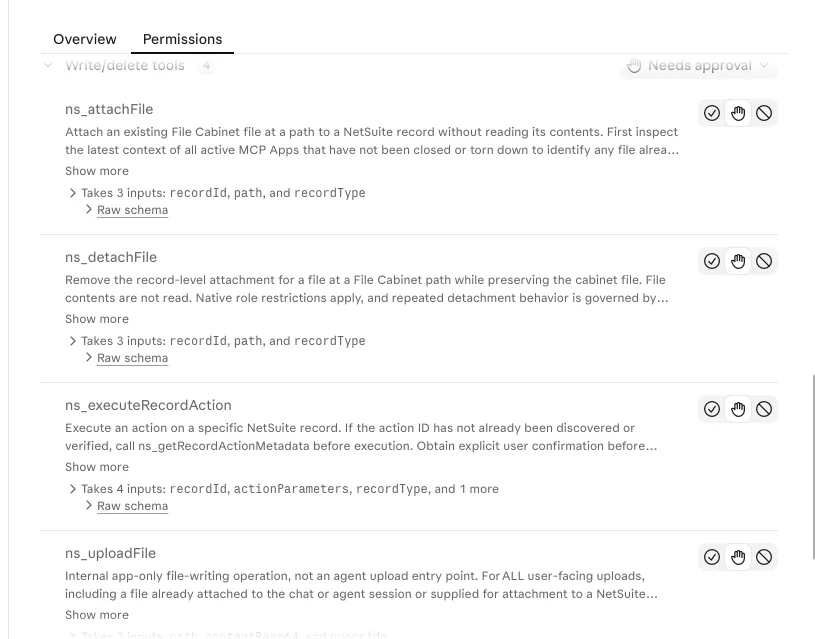
The record actions are narrow. Purchase orders offered Approve and Close. Journal entries offered Approve. Invoices offered three invoice grouping actions. Inventory adjustments, item receipts, vendor bills and work orders offered none at all.
That is why questions 3 and 4 failed for every role. NetSuite did not refuse them. The connector had no way to ask. "Read and write" in this connector means record actions and file handling rather than transaction entry.
Treat that as a description of what I saw on November 17, 2026 rather than a permanent ceiling. Oracle can add tools, and the roles being connected today already carry the permissions those tools would use.
The Results
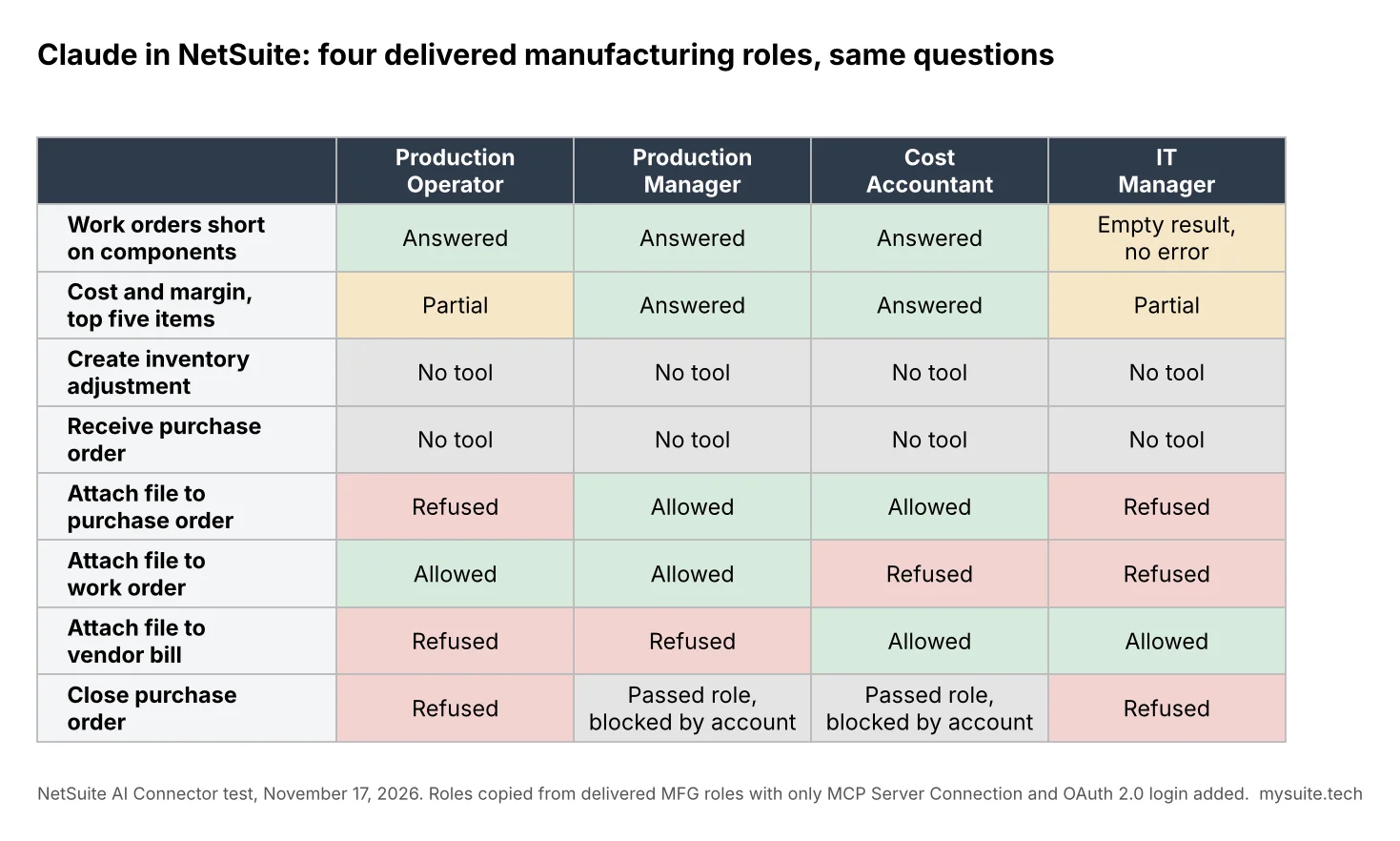
| Production Operator | Production Manager | Cost Accountant | IT Manager | |
|---|---|---|---|---|
| Work orders short on components | Answered | Answered | Answered | Empty result, no error |
| Cost and margin, top five items | Partial: no sales visible, item costs visible | Answered | Answered | Partial: no sales visible, item costs visible |
| Create inventory adjustment | No tool | No tool | No tool | No tool |
| Receive purchase order | No tool | No tool | No tool | No tool |
| Attach file to purchase order | Refused by NetSuite | Allowed | Allowed | Refused by NetSuite |
| Attach file to work order | Allowed | Allowed | Refused by NetSuite | Refused by NetSuite |
| Attach file to vendor bill | Refused by NetSuite | Refused by NetSuite | Allowed | Allowed |
| Close purchase order | Refused by NetSuite | Passed the role check, then blocked: action not available in this account | Passed the role check, then blocked: action not available in this account | Refused by NetSuite |
The attach rows show the control most clearly. Same tool, same file, the same three target records, four roles. Each row came back two allowed and two refused, and a different pair of roles succeeded in each one. The Production Operator reached the work order and nothing else. The Production Manager reached the work order and the purchase order. The Cost Accountant reached the purchase order and the vendor bill. The IT Manager reached only the vendor bill. Every outcome matched that role's permission on that record type.
The Close test showed the order NetSuite checks things in, and it put the role check in writing. The Production Operator, which holds view access to purchase orders, was told it needs a higher level of the Transactions, Purchase Order permission. The IT Manager, which holds no purchase order permission at all, was told it needs the permission. Same tool, same record, two different refusals tracking two different permission levels. The Production Manager and the Cost Accountant passed that check and then hit a second message saying the action is not available in this account. The role check runs first, and NetSuite names what it checked.
Four Things That Surprised Me
The Floor Role Could See Unit Cost
The Production Operator could not see a single sales order or invoice. It could still read standard cost, average cost, last purchase price and every price level on the item record, which is enough to work out unit margin on anything in the catalogue.
The connector did not cause this. The role design did, and it was sitting in the account long before any AI was connected, set by whoever configured it and probably never revisited since. What the connector changes is how quickly somebody can act on it. Reading costs off an item record one at a time is tedious enough that nobody bothers. Asking a question in plain language is not.
Some Roles Got an Empty Answer Instead of a Refusal
When the IT Manager asked which work orders were short, it got zero rows and no error. That role cannot see work orders. The answer was indistinguishable from "nothing is short." The Production Operator got the same shape of result on sales.
In this test, a role that could not see something usually received an empty result rather than a message saying so. For anyone making a decision off the answer, those two outcomes look identical and mean opposite things.
The First Margin Answer Was Wrong, and It Looked Right
For the Production Manager, the first cost and margin answer listed five real items with real quantities and no revenue at all. I nearly wrote it off as a permission limit, which would have been a tidy and completely incorrect conclusion.
Opening one of the invoices in NetSuite under that same role showed the line amount, cost and gross profit plainly. The problem was the query. Invoices for one contract manufactured assembly carry extra lines with no amounts, and those lines sorted to the top. Once the query was fixed, the Production Manager and the Cost Accountant returned the same correct numbers.
The role was right the whole time. The answer was still wrong until somebody checked it against the record.
The Approval Prompts Are Written for a Developer
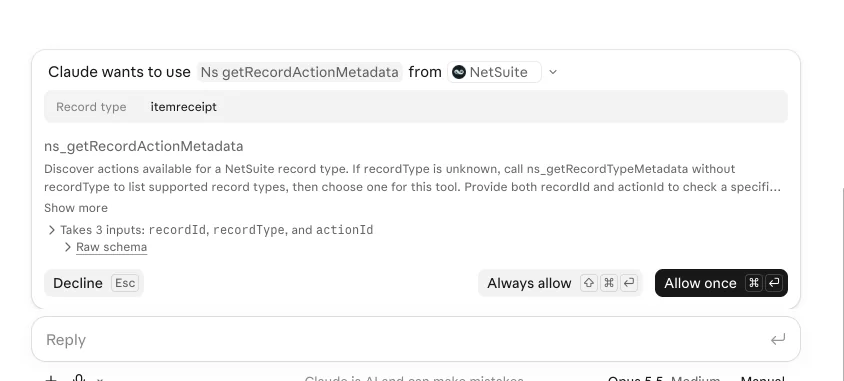
Claude asked me to approve individual calls, including some read-only ones. Each prompt showed a tool name such as ns_getRecordActionMetadata, the raw inputs, and a technical description written for whoever builds against the API.
A production operator has no basis on which to judge that. And each prompt offers Always allow. After a few dozen of them, most people will take it, and from that point the role is the only control still standing.
What NetSuite Records, and What It Does Not
The connector writes to NetSuite script execution logs. There are separate deployments for the SuiteQL tools and the record action tools. Every call writes a start row and then a success or failure row, with the user and the time.
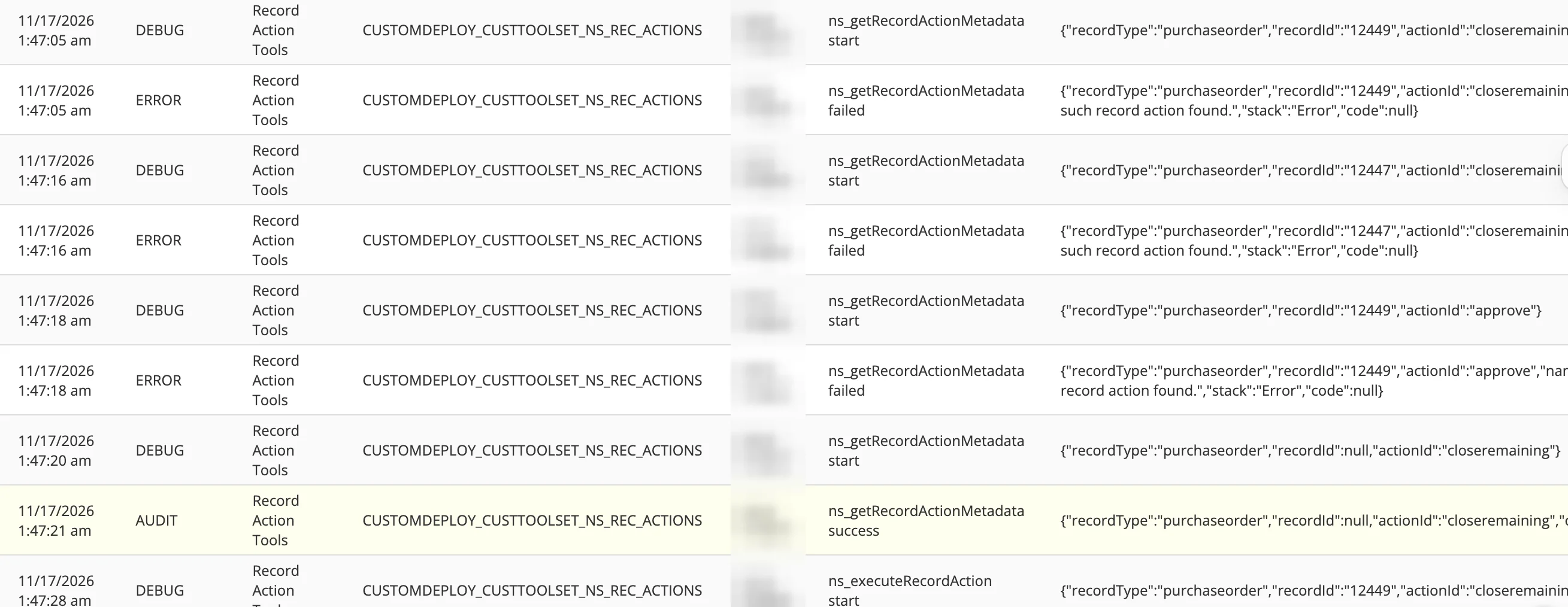
The two logs are not equally useful, and the difference matters more than it first appears.
The record action log gives you the record type, the record ID and the action. That is a real audit trail. The SuiteQL log gives you the length of the query and the number of rows it returned, but not the query text. What it shows instead, as the readable description on each row, is the sentence Claude wrote to label its own call.
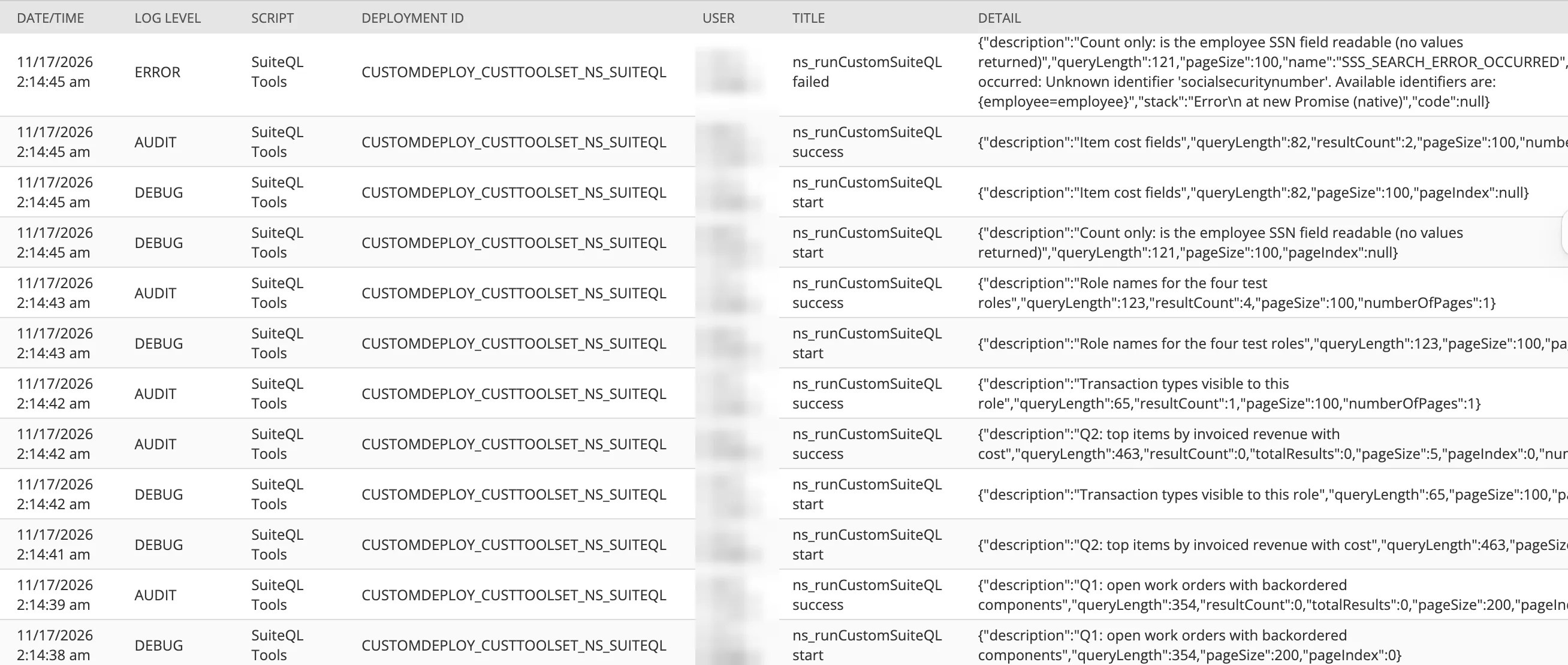
So the readable part of your SuiteQL audit trail is a narrative composed by the thing being audited. The descriptions on these rows were accurate and useful. They are still not evidence of what ran, and you cannot reconstruct a query from a row that records only its character count.
One of those rows is worth looking at directly. Under the IT Manager role I asked whether the employee social security number field was readable, as a permissions probe, counting rows only and returning no values. The attempt failed because the field is not exposed under the name tried, and it landed in the log as an error row carrying its own description: "Count only: is the employee SSN field readable (no values returned)."
That row is the useful one in the whole set. The log caught an attempt that returned nothing and changed nothing, which is exactly what you want a log to do. It caught it as a sentence the model wrote about itself, which is exactly the part to be careful about.
Retention is short. Oracle states twenty-one days in production and seven in sandbox. Anything you need beyond that has to be taken out and kept somewhere else, which is a real consideration for a regulated manufacturer.
System Notes did not record the one write I could check against it. After a file was attached to a work order through the connector, I opened that work order as administrator. The file was there, under Communication and then Files. System Notes had no entry for it. The Files subtab showed the file's own last modified date, which was months old, rather than when it was attached or by whom. For connector file attachments in this account the script execution log was the only record of who attached what and when, and that log expires in twenty-one days.
What This Means for a Manufacturer
The test supports last week's argument and adds a second layer to it.
The role sets the outer limit of what Claude can see and do. Inside that limit, the connector's tool list decides what it can change today, and that list is currently short. Both limits have to hold.
The second one is not yours to control. The Production Manager role I tested already holds full permission to adjust inventory and receive purchase orders in NetSuite. Nothing about that role would need to change for those actions to become reachable. If Oracle ships the tools, the permission is already there, granted by somebody who was thinking about a person and a screen rather than a connector.
Which is the part worth acting on now, while it is still a configuration question rather than an incident.
Role Design Guidance
Before anyone connects
- A dedicated role for AI access, copied from the delivered role, reviewed before use
- MCP Server Connection and Log In Using OAuth 2.0 Access Tokens added, and the connector permission kept off roles people already log in with
- Permissions the connector does not need removed; the delivered Production Operator, Production Manager and IT Manager roles in my account all carried full SuiteScript, Web Services and Deleted Records permissions, while the Cost Accountant carried none of those and worked fine
- A decision on which roles should see standard cost, average cost, last purchase price and price levels
- A written rule for who may use Always allow and who must approve each call
Once people are using it
- One figure checked against the record or a saved search before anyone acts on a cost, margin or inventory answer
- A standing follow-up when an answer comes back empty: can this role see those records at all
- A named owner for the execution logs, reading them weekly for the first month
- Awareness that a file attached through the connector may leave no System Notes entry, which makes the execution log the only record of it
- A way to retain log rows past twenty-one days if your auditors will ask for them
Where to Start
If you are planning to connect Claude or any other AI client to NetSuite, the work is role design, and it is the same work whether or not the AI ever arrives. Overprivileged roles, segregation-of-duties conflicts and stale integration access are what a NetSuite Health Check already looks for across fifteen areas, and they are precisely the things a connector inherits.
What I would do first in your account is list the roles you intend to connect and establish what each one can see and change today. That is a short exercise with a written answer at the end of it.
Frequently Asked Questions
Can Claude create transactions in NetSuite through the AI Connector?
It could not in this test. On November 17, 2026 the connector offered no tool to create, edit or transform a transaction. The tools able to change data were record actions such as Approve and Close, plus file attach, detach and upload. Oracle can add tools later, and the roles being connected today already hold the permissions those tools would use.
Does the NetSuite role control what Claude can see and do?
Yes. In this test every read and every write attempted was bounded by the permissions of the connected role. NetSuite refused the writes the role was not entitled to make and allowed the ones it was, on identical tools against identical records.
Can I connect the Administrator role?
No, and the restriction is wider than the Administrator label. Oracle rules out that role, then extends the same bar on its Required Features and Permissions page to any role holding full permissions to access NetSuite features. The stated reason is to limit the damage if the security of the external AI client is compromised, so a role built only to avoid the Administrator name does not meet it.
What permissions does a role need to connect?
MCP Server Connection and Log In Using OAuth 2.0 Access Tokens. Oracle warns specifically against confusing that second one with the similarly named Log In Using Access Tokens permission. In this test everything else came from the delivered role.
Will Claude tell me when a role cannot see something?
Not reliably. In this test, roles lacking access to a record type usually received an empty result rather than an error. An empty answer and a genuinely empty data set look the same, so establish whether the role can see those records before treating nothing found as a finding.
Where can I see what Claude did in NetSuite?
In the script execution logs for the connector tool deployments, which were separate for SuiteQL and record actions. The record action log shows record type, record ID and action. The SuiteQL log shows query length and result count rather than the query itself, alongside a description the model wrote for its own call. A file attached through the connector produced no System Notes entry on the record in this test, so the execution log was the only record of it. Oracle retains these for twenty-one days in production and seven in sandbox.
Need help with NetSuite?
Every result here came from role configuration that was already in the account before any AI was involved. Establishing what your roles can see and change today is worth doing while it is still a configuration question.
 By: Patrick Olson 11/17/2026
Read Next - Claude for Manufacturing and NetSuite: What It Reads and Writes